> ## Documentation Index
> Fetch the complete documentation index at: https://docs-dev-actions-modules-ga.mintlify.site/llms.txt
> Use this file to discover all available pages before exploring further.

> Learn how to configure an update policy form using Forms for Actions for users to review and accept new terms of service or consent updates.

# Use Cases: Configure an update policy form using Forms

<Card title="Before you start">
  1. Create a [Machine-to-Machine Application](/docs/get-started/auth0-overview/create-applications/machine-to-machine-apps) with the following scopes enabled:

  * `read:users`
  * `update:users`
  * `create:users`
  * `read:users_app_metadata`
  * `update:users_app_metadata`
  * `create:users_app_metadata`

  2. Add a [Vault connection](/docs/customize/forms/vault) using the M2M application credentials.
</Card>

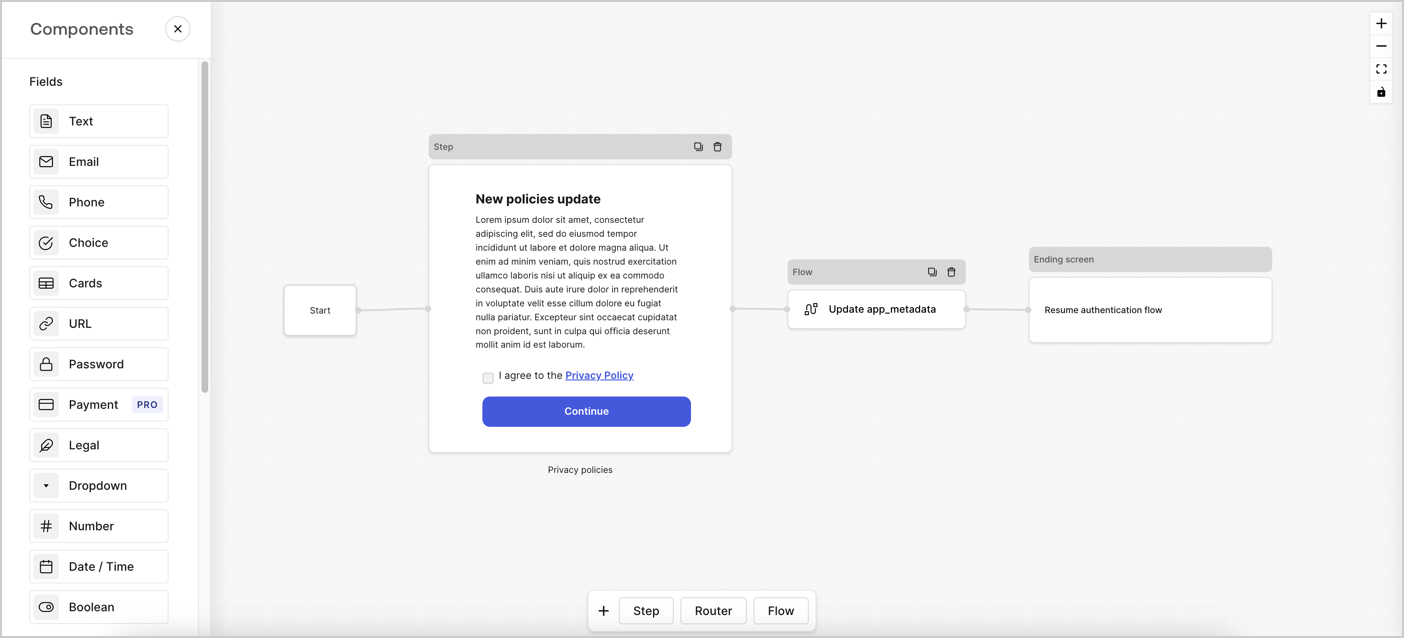
Forms for Actions allows you to create custom privacy policies flows and store the consent under the `app_metadata` object.
<Frame>
  <img src="https://mintcdn.com/docs-dev-actions-modules-ga/VoHcLQmUhcioCx43/docs/images/cdy7uua7fh8z/6i68dMvHDTijfRmSgN1x8Q/ad900e7d4c0fb34645921435472b8684/privavy-policy-form.png?fit=max&auto=format&n=VoHcLQmUhcioCx43&q=85&s=00dcbd8bf2d49c2e564a0603270ed1b7" alt="Dashboard > Actions > Forms > Privacy policy use case" data-og-width="1404" width="1404" data-og-height="638" height="638" data-path="docs/images/cdy7uua7fh8z/6i68dMvHDTijfRmSgN1x8Q/ad900e7d4c0fb34645921435472b8684/privavy-policy-form.png" data-optimize="true" data-opv="3" srcset="https://mintcdn.com/docs-dev-actions-modules-ga/VoHcLQmUhcioCx43/docs/images/cdy7uua7fh8z/6i68dMvHDTijfRmSgN1x8Q/ad900e7d4c0fb34645921435472b8684/privavy-policy-form.png?w=280&fit=max&auto=format&n=VoHcLQmUhcioCx43&q=85&s=9af27c5669367b8f2fe4deccf5294b1e 280w, https://mintcdn.com/docs-dev-actions-modules-ga/VoHcLQmUhcioCx43/docs/images/cdy7uua7fh8z/6i68dMvHDTijfRmSgN1x8Q/ad900e7d4c0fb34645921435472b8684/privavy-policy-form.png?w=560&fit=max&auto=format&n=VoHcLQmUhcioCx43&q=85&s=679b8fb93bef2b5c0afaffe418f064ad 560w, https://mintcdn.com/docs-dev-actions-modules-ga/VoHcLQmUhcioCx43/docs/images/cdy7uua7fh8z/6i68dMvHDTijfRmSgN1x8Q/ad900e7d4c0fb34645921435472b8684/privavy-policy-form.png?w=840&fit=max&auto=format&n=VoHcLQmUhcioCx43&q=85&s=3a30069a2c0084ec6822dc487991c5e8 840w, https://mintcdn.com/docs-dev-actions-modules-ga/VoHcLQmUhcioCx43/docs/images/cdy7uua7fh8z/6i68dMvHDTijfRmSgN1x8Q/ad900e7d4c0fb34645921435472b8684/privavy-policy-form.png?w=1100&fit=max&auto=format&n=VoHcLQmUhcioCx43&q=85&s=dbf0678165045f870cd553d36248fedf 1100w, https://mintcdn.com/docs-dev-actions-modules-ga/VoHcLQmUhcioCx43/docs/images/cdy7uua7fh8z/6i68dMvHDTijfRmSgN1x8Q/ad900e7d4c0fb34645921435472b8684/privavy-policy-form.png?w=1650&fit=max&auto=format&n=VoHcLQmUhcioCx43&q=85&s=7cc6b1e1e544343d22ac2f0ba329ca15 1650w, https://mintcdn.com/docs-dev-actions-modules-ga/VoHcLQmUhcioCx43/docs/images/cdy7uua7fh8z/6i68dMvHDTijfRmSgN1x8Q/ad900e7d4c0fb34645921435472b8684/privavy-policy-form.png?w=2500&fit=max&auto=format&n=VoHcLQmUhcioCx43&q=85&s=46f903c0b4a6501d7b2b55f62aad660e 2500w" />
</Frame>

The sections below outline how you can create an Update Policy form using nodes and flows, along with steps for adding your form to a [Post Login](/docs/customize/actions/explore-triggers/signup-and-login-triggers/login-trigger) Action.

## Create a form from scratch

Follow these steps to create a form to gather information:

1. Open the Form editor by selecting **Auth0 Dashboard > Actions > Forms.**
2. Select **Create Form** > **Start from scratch**.

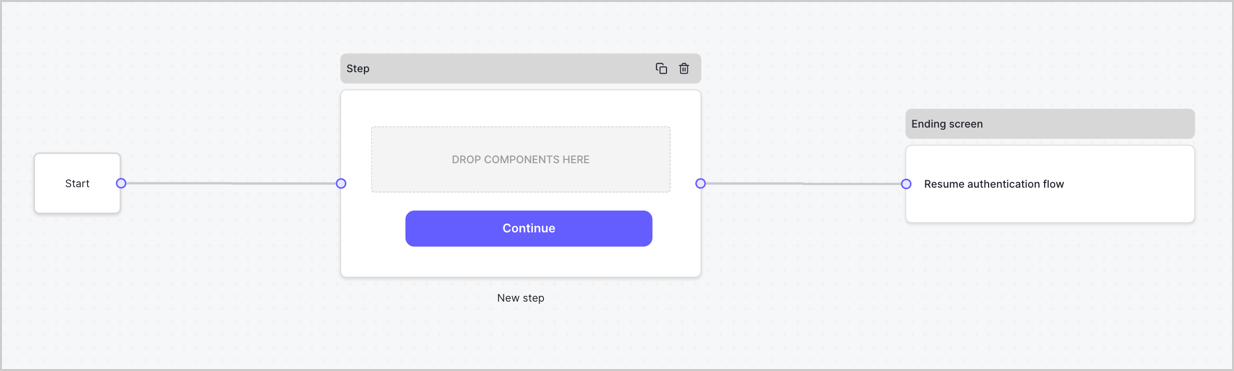
By default, a new form contains a Start node, a Step node, and an Ending screen node.
<Frame>
  <img src="https://mintcdn.com/docs-dev-actions-modules-ga/ejCUjmhOatcNpy6n/docs/images/cdy7uua7fh8z/2TZ9jSjgEcARFpULI6hz4R/a4319a1bd482f2ee5cc23100fdb2f42c/New-form-Forms-for-action-use-case.png?fit=max&auto=format&n=ejCUjmhOatcNpy6n&q=85&s=8d954b8d766cc86f524fe3070b5f8139" alt="Dashboard > Forms > Use Cases > Form" data-og-width="1234" width="1234" data-og-height="371" height="371" data-path="docs/images/cdy7uua7fh8z/2TZ9jSjgEcARFpULI6hz4R/a4319a1bd482f2ee5cc23100fdb2f42c/New-form-Forms-for-action-use-case.png" data-optimize="true" data-opv="3" srcset="https://mintcdn.com/docs-dev-actions-modules-ga/ejCUjmhOatcNpy6n/docs/images/cdy7uua7fh8z/2TZ9jSjgEcARFpULI6hz4R/a4319a1bd482f2ee5cc23100fdb2f42c/New-form-Forms-for-action-use-case.png?w=280&fit=max&auto=format&n=ejCUjmhOatcNpy6n&q=85&s=bfd5fa4b47f064f9b848945d467bd994 280w, https://mintcdn.com/docs-dev-actions-modules-ga/ejCUjmhOatcNpy6n/docs/images/cdy7uua7fh8z/2TZ9jSjgEcARFpULI6hz4R/a4319a1bd482f2ee5cc23100fdb2f42c/New-form-Forms-for-action-use-case.png?w=560&fit=max&auto=format&n=ejCUjmhOatcNpy6n&q=85&s=8e656ec41e00832d0588d0c7ade8c07c 560w, https://mintcdn.com/docs-dev-actions-modules-ga/ejCUjmhOatcNpy6n/docs/images/cdy7uua7fh8z/2TZ9jSjgEcARFpULI6hz4R/a4319a1bd482f2ee5cc23100fdb2f42c/New-form-Forms-for-action-use-case.png?w=840&fit=max&auto=format&n=ejCUjmhOatcNpy6n&q=85&s=fb2ea875edd4e1786bc62b0ff7d52df1 840w, https://mintcdn.com/docs-dev-actions-modules-ga/ejCUjmhOatcNpy6n/docs/images/cdy7uua7fh8z/2TZ9jSjgEcARFpULI6hz4R/a4319a1bd482f2ee5cc23100fdb2f42c/New-form-Forms-for-action-use-case.png?w=1100&fit=max&auto=format&n=ejCUjmhOatcNpy6n&q=85&s=f0da6d893a3f5cd486cefbd90cf75061 1100w, https://mintcdn.com/docs-dev-actions-modules-ga/ejCUjmhOatcNpy6n/docs/images/cdy7uua7fh8z/2TZ9jSjgEcARFpULI6hz4R/a4319a1bd482f2ee5cc23100fdb2f42c/New-form-Forms-for-action-use-case.png?w=1650&fit=max&auto=format&n=ejCUjmhOatcNpy6n&q=85&s=dbfb75f32198ed0820ff9eabbc7b0aa9 1650w, https://mintcdn.com/docs-dev-actions-modules-ga/ejCUjmhOatcNpy6n/docs/images/cdy7uua7fh8z/2TZ9jSjgEcARFpULI6hz4R/a4319a1bd482f2ee5cc23100fdb2f42c/New-form-Forms-for-action-use-case.png?w=2500&fit=max&auto=format&n=ejCUjmhOatcNpy6n&q=85&s=18351bc0bd996d8d810b88661a686532 2500w" />
</Frame>

### Configure the Step node

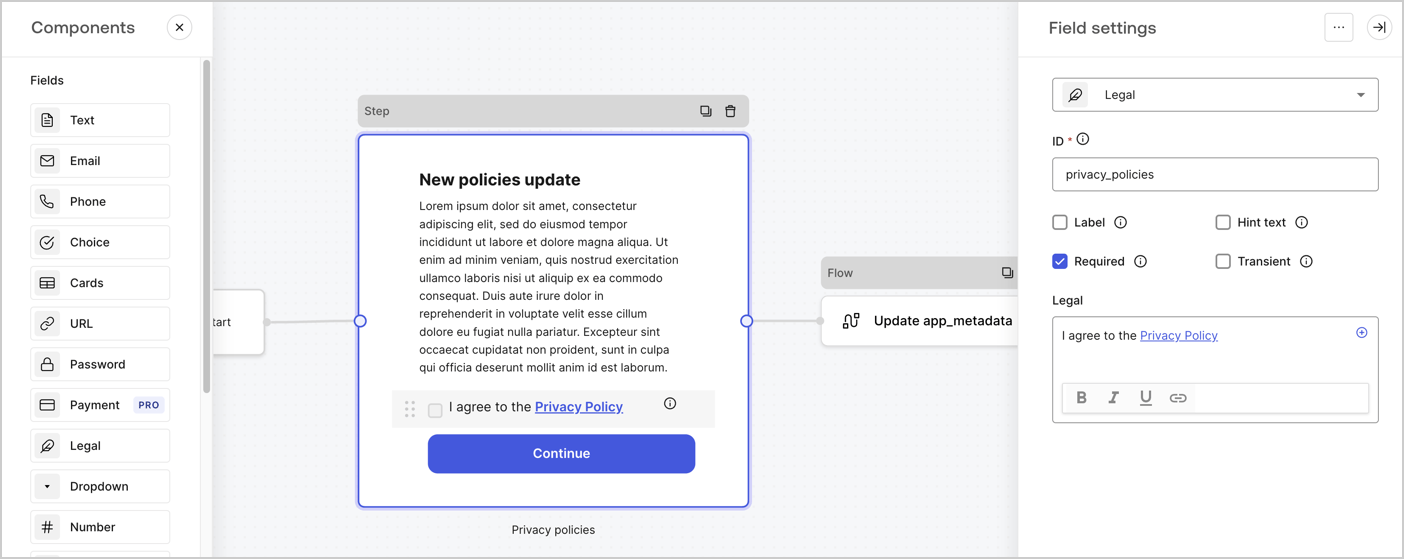
The Step node is the graphical interface visible to users. Add [Fields](/docs/customize/forms/nodes-and-components) to the Step node to collect the new agreement acceptance value by following these steps:

1. Drag a **Rich text** field from the **Components menu** into the **Step** node.

   * **Rich text**: Enter a description of your privacy policies updates.
   * Select **Save**.
2. Drag a **Legal** field into the **Step** node.

   * **ID**: Enter `privacy_policies`.
   * **Required**: Enable the checkbox.
   * **Legal**: Enter `I agree to the Privacy Policy`.
   * Select **Save**.
3. Select **Publish** to save.
<Frame>
  <img src="https://mintcdn.com/docs-dev-actions-modules-ga/P-4u4cFaLlCrtC75/docs/images/cdy7uua7fh8z/59zFFjQjAnjogkc2QGIqqJ/0ad66b1b636544122aa4e65968b76c2c/privacy-policy-step-node.png?fit=max&auto=format&n=P-4u4cFaLlCrtC75&q=85&s=b6fe293be217276006190155eaedabf2" alt="Dashboard > Actions > Forms > Use case privacy policy step node" data-og-width="1404" width="1404" data-og-height="559" height="559" data-path="docs/images/cdy7uua7fh8z/59zFFjQjAnjogkc2QGIqqJ/0ad66b1b636544122aa4e65968b76c2c/privacy-policy-step-node.png" data-optimize="true" data-opv="3" srcset="https://mintcdn.com/docs-dev-actions-modules-ga/P-4u4cFaLlCrtC75/docs/images/cdy7uua7fh8z/59zFFjQjAnjogkc2QGIqqJ/0ad66b1b636544122aa4e65968b76c2c/privacy-policy-step-node.png?w=280&fit=max&auto=format&n=P-4u4cFaLlCrtC75&q=85&s=7b115d522c9abca747f2d7fd75c92201 280w, https://mintcdn.com/docs-dev-actions-modules-ga/P-4u4cFaLlCrtC75/docs/images/cdy7uua7fh8z/59zFFjQjAnjogkc2QGIqqJ/0ad66b1b636544122aa4e65968b76c2c/privacy-policy-step-node.png?w=560&fit=max&auto=format&n=P-4u4cFaLlCrtC75&q=85&s=1296209aa173e1674f5795f4759fe62f 560w, https://mintcdn.com/docs-dev-actions-modules-ga/P-4u4cFaLlCrtC75/docs/images/cdy7uua7fh8z/59zFFjQjAnjogkc2QGIqqJ/0ad66b1b636544122aa4e65968b76c2c/privacy-policy-step-node.png?w=840&fit=max&auto=format&n=P-4u4cFaLlCrtC75&q=85&s=3fcb5ee1d0bb5b4c00c1b119df374b82 840w, https://mintcdn.com/docs-dev-actions-modules-ga/P-4u4cFaLlCrtC75/docs/images/cdy7uua7fh8z/59zFFjQjAnjogkc2QGIqqJ/0ad66b1b636544122aa4e65968b76c2c/privacy-policy-step-node.png?w=1100&fit=max&auto=format&n=P-4u4cFaLlCrtC75&q=85&s=f0835853a9d636369e70e5da5d671020 1100w, https://mintcdn.com/docs-dev-actions-modules-ga/P-4u4cFaLlCrtC75/docs/images/cdy7uua7fh8z/59zFFjQjAnjogkc2QGIqqJ/0ad66b1b636544122aa4e65968b76c2c/privacy-policy-step-node.png?w=1650&fit=max&auto=format&n=P-4u4cFaLlCrtC75&q=85&s=a63d6afdf09acb4a25b7b8a5434ed539 1650w, https://mintcdn.com/docs-dev-actions-modules-ga/P-4u4cFaLlCrtC75/docs/images/cdy7uua7fh8z/59zFFjQjAnjogkc2QGIqqJ/0ad66b1b636544122aa4e65968b76c2c/privacy-policy-step-node.png?w=2500&fit=max&auto=format&n=P-4u4cFaLlCrtC75&q=85&s=9115b19da28ebfc0a77bde4039cdad65 2500w" />
</Frame>

### Configure the Flow node

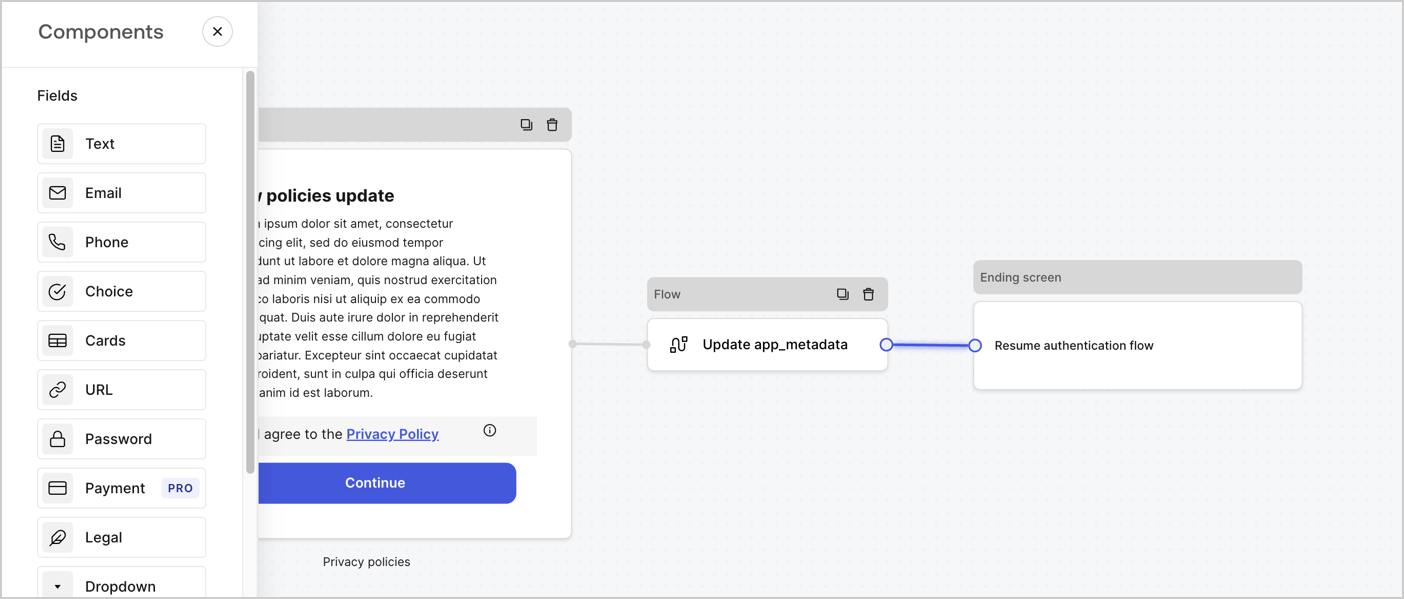
Add a **Flow** node after the **Step** node to update the `app_metadata` and resume the authentication flow by following these steps:

1. Select **Flow** from the bottom of the Form editor.
2. Remove the existing link between the **Step** and **Ending Screen** nodes.
3. Select the new **Flow** > **Click to add a flow** > **Create a new flow.**

   * Enter `Update app_metadata` in the **Name** field.
   * Select **Create**.
   * Select **Save**.
4. Link the **Flow** node to the **Step** and **Ending Screen** nodes as pictured below.
5. Select **Publish** to save.
<Frame>
  <img src="https://mintcdn.com/docs-dev-actions-modules-ga/VoHcLQmUhcioCx43/docs/images/cdy7uua7fh8z/6YIkzm7SrpM9LW76AXuRzh/353c518fe82bbaa440836da1d83596d6/link-policies.png?fit=max&auto=format&n=VoHcLQmUhcioCx43&q=85&s=033aa95ad01211429ca040e7b0c410ad" alt="Dashboard > Actions > Forms > Form" data-og-width="1404" width="1404" data-og-height="599" height="599" data-path="docs/images/cdy7uua7fh8z/6YIkzm7SrpM9LW76AXuRzh/353c518fe82bbaa440836da1d83596d6/link-policies.png" data-optimize="true" data-opv="3" srcset="https://mintcdn.com/docs-dev-actions-modules-ga/VoHcLQmUhcioCx43/docs/images/cdy7uua7fh8z/6YIkzm7SrpM9LW76AXuRzh/353c518fe82bbaa440836da1d83596d6/link-policies.png?w=280&fit=max&auto=format&n=VoHcLQmUhcioCx43&q=85&s=2061fd3923f7f5ee444f0d8be86ef50e 280w, https://mintcdn.com/docs-dev-actions-modules-ga/VoHcLQmUhcioCx43/docs/images/cdy7uua7fh8z/6YIkzm7SrpM9LW76AXuRzh/353c518fe82bbaa440836da1d83596d6/link-policies.png?w=560&fit=max&auto=format&n=VoHcLQmUhcioCx43&q=85&s=f1fdf8a5804b0de0d96c1619553aa364 560w, https://mintcdn.com/docs-dev-actions-modules-ga/VoHcLQmUhcioCx43/docs/images/cdy7uua7fh8z/6YIkzm7SrpM9LW76AXuRzh/353c518fe82bbaa440836da1d83596d6/link-policies.png?w=840&fit=max&auto=format&n=VoHcLQmUhcioCx43&q=85&s=043a7d37a66c3f6ff266d6c0cae789e9 840w, https://mintcdn.com/docs-dev-actions-modules-ga/VoHcLQmUhcioCx43/docs/images/cdy7uua7fh8z/6YIkzm7SrpM9LW76AXuRzh/353c518fe82bbaa440836da1d83596d6/link-policies.png?w=1100&fit=max&auto=format&n=VoHcLQmUhcioCx43&q=85&s=e55a846198e6ac0862450814c8474e47 1100w, https://mintcdn.com/docs-dev-actions-modules-ga/VoHcLQmUhcioCx43/docs/images/cdy7uua7fh8z/6YIkzm7SrpM9LW76AXuRzh/353c518fe82bbaa440836da1d83596d6/link-policies.png?w=1650&fit=max&auto=format&n=VoHcLQmUhcioCx43&q=85&s=4740b98c8a3a5f5fc98d754b76f0511b 1650w, https://mintcdn.com/docs-dev-actions-modules-ga/VoHcLQmUhcioCx43/docs/images/cdy7uua7fh8z/6YIkzm7SrpM9LW76AXuRzh/353c518fe82bbaa440836da1d83596d6/link-policies.png?w=2500&fit=max&auto=format&n=VoHcLQmUhcioCx43&q=85&s=61c4faf319a83c911dbf34f41c69cc4a 2500w" />
</Frame>

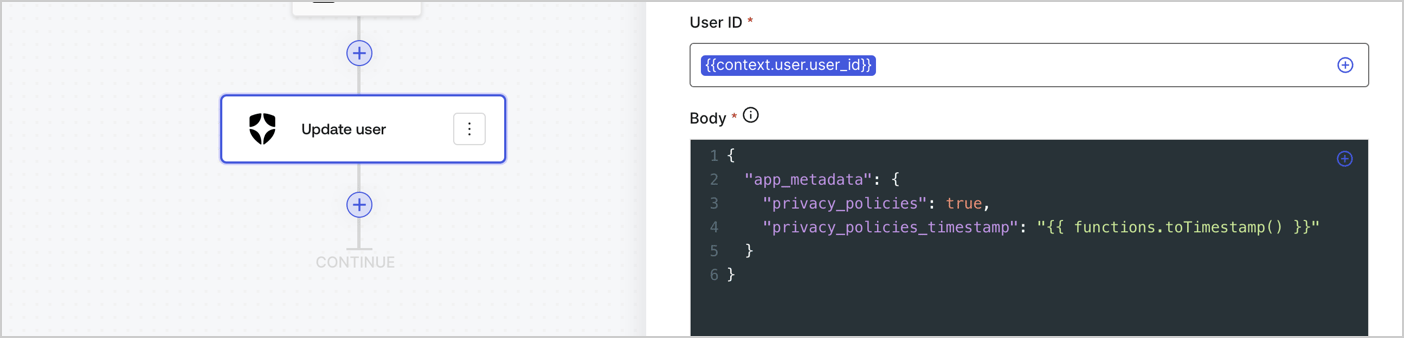
Add an Auth0 Update user action to the flow by following these steps:

1. Select the **Flow** **Update app\_metadata** > **Edit flow** to open the Flow editor in a new tab.
2. Below the StartAction, select the **+** icon to add an **Update user** action. Complete the fields below, then select **Save** to continue.

   * **Connection**: Select from the dropdown the Vault connection to your M2M application.

   * **User ID**: Enter `{{context.user.user_id}}`.

   * **Body**: Copy and paste the following code to update the app\_metadata with the privacy\_policies and privacy\_policies\_timestamp properties.

     ```text lines theme={null}
     {
       "app_metadata": {
         "privacy_policies": true,
         "privacy_policies_timestamp": "{{ functions.toTimestamp() }}"
       }
     }
     ```

   * Select **Save**.
3. Select **Publish** to save.
<Frame>
  <img src="https://mintcdn.com/docs-dev-actions-modules-ga/O9fMOfrZq2Cu62oF/docs/images/cdy7uua7fh8z/CvMNIwWrOUwaFW4X3G28p/1fb70ae57a20749d9ffaaba8dc0b7e26/update-user-privacy.png?fit=max&auto=format&n=O9fMOfrZq2Cu62oF&q=85&s=eccb353a9524514a2aa23268d170fe08" alt="Dashboard > Actions > Forms > User case privacy policy code" data-og-width="1404" width="1404" data-og-height="338" height="338" data-path="docs/images/cdy7uua7fh8z/CvMNIwWrOUwaFW4X3G28p/1fb70ae57a20749d9ffaaba8dc0b7e26/update-user-privacy.png" data-optimize="true" data-opv="3" srcset="https://mintcdn.com/docs-dev-actions-modules-ga/O9fMOfrZq2Cu62oF/docs/images/cdy7uua7fh8z/CvMNIwWrOUwaFW4X3G28p/1fb70ae57a20749d9ffaaba8dc0b7e26/update-user-privacy.png?w=280&fit=max&auto=format&n=O9fMOfrZq2Cu62oF&q=85&s=0cbd6c86f460dcb4dfb5ea8951e36141 280w, https://mintcdn.com/docs-dev-actions-modules-ga/O9fMOfrZq2Cu62oF/docs/images/cdy7uua7fh8z/CvMNIwWrOUwaFW4X3G28p/1fb70ae57a20749d9ffaaba8dc0b7e26/update-user-privacy.png?w=560&fit=max&auto=format&n=O9fMOfrZq2Cu62oF&q=85&s=ac2493da5f091fc6d049a3a02ba027a2 560w, https://mintcdn.com/docs-dev-actions-modules-ga/O9fMOfrZq2Cu62oF/docs/images/cdy7uua7fh8z/CvMNIwWrOUwaFW4X3G28p/1fb70ae57a20749d9ffaaba8dc0b7e26/update-user-privacy.png?w=840&fit=max&auto=format&n=O9fMOfrZq2Cu62oF&q=85&s=38ebadf7a26655e7efbfff8bacc273fb 840w, https://mintcdn.com/docs-dev-actions-modules-ga/O9fMOfrZq2Cu62oF/docs/images/cdy7uua7fh8z/CvMNIwWrOUwaFW4X3G28p/1fb70ae57a20749d9ffaaba8dc0b7e26/update-user-privacy.png?w=1100&fit=max&auto=format&n=O9fMOfrZq2Cu62oF&q=85&s=efb52123e59568489836bbfa135ca64f 1100w, https://mintcdn.com/docs-dev-actions-modules-ga/O9fMOfrZq2Cu62oF/docs/images/cdy7uua7fh8z/CvMNIwWrOUwaFW4X3G28p/1fb70ae57a20749d9ffaaba8dc0b7e26/update-user-privacy.png?w=1650&fit=max&auto=format&n=O9fMOfrZq2Cu62oF&q=85&s=1661b162fadfe04ae4485539803bb134 1650w, https://mintcdn.com/docs-dev-actions-modules-ga/O9fMOfrZq2Cu62oF/docs/images/cdy7uua7fh8z/CvMNIwWrOUwaFW4X3G28p/1fb70ae57a20749d9ffaaba8dc0b7e26/update-user-privacy.png?w=2500&fit=max&auto=format&n=O9fMOfrZq2Cu62oF&q=85&s=29390410694d4f98e4568cd41d0093fa 2500w" />
</Frame>

<Callout icon="file-lines" color="#0EA5E9" iconType="regular">
  The flow **Update app\_metadata** adds a `privacy_policies true` value to the app`_metadata` object and also generates a timestamp with a [helper function.](/docs/customize/forms/variables)
</Callout>

## Retrieve the form render code

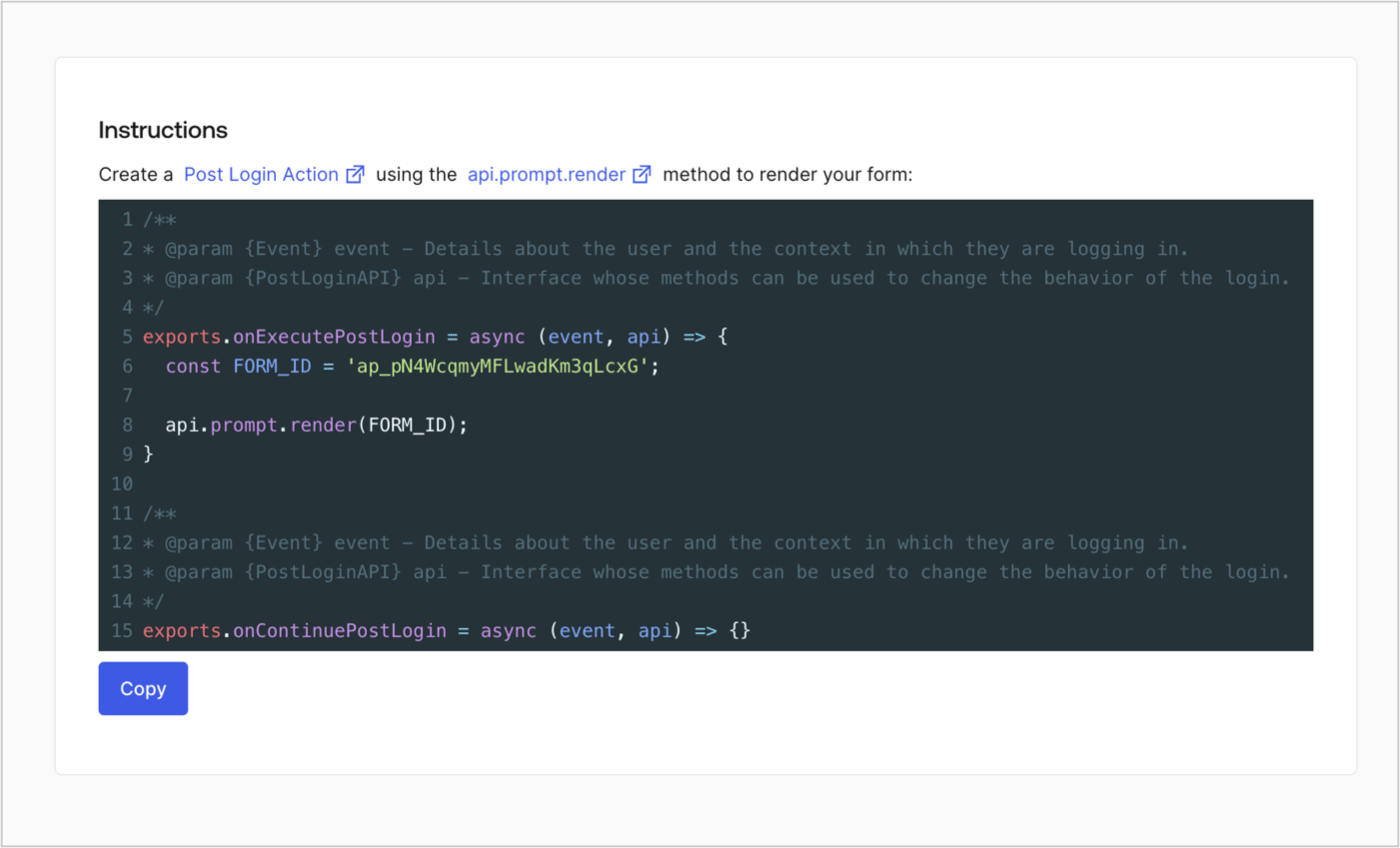
Retrieve your form render code to visually render the form with a custom Post Login Action by following these steps:

* From the Form editor, select **`<> Render`**.
* Select **Copy**.
<Frame>
  <img src="https://mintcdn.com/docs-dev-actions-modules-ga/XcU4Cq6_0A7x7at9/docs/images/cdy7uua7fh8z/2EIUzc539sq9lwoTKbjoJv/496a864c0fc44a782c9cadca119dbfb0/embed.png?fit=max&auto=format&n=XcU4Cq6_0A7x7at9&q=85&s=27ac7b901e133a7f6643a1222cec3d93" alt="Dashboard > Actions > Forms > Form > Embed" data-og-width="1400" width="1400" data-og-height="848" height="848" data-path="docs/images/cdy7uua7fh8z/2EIUzc539sq9lwoTKbjoJv/496a864c0fc44a782c9cadca119dbfb0/embed.png" data-optimize="true" data-opv="3" srcset="https://mintcdn.com/docs-dev-actions-modules-ga/XcU4Cq6_0A7x7at9/docs/images/cdy7uua7fh8z/2EIUzc539sq9lwoTKbjoJv/496a864c0fc44a782c9cadca119dbfb0/embed.png?w=280&fit=max&auto=format&n=XcU4Cq6_0A7x7at9&q=85&s=6d95c5c5e4039f40952db58d0ea3e182 280w, https://mintcdn.com/docs-dev-actions-modules-ga/XcU4Cq6_0A7x7at9/docs/images/cdy7uua7fh8z/2EIUzc539sq9lwoTKbjoJv/496a864c0fc44a782c9cadca119dbfb0/embed.png?w=560&fit=max&auto=format&n=XcU4Cq6_0A7x7at9&q=85&s=9895327aaab19c84d2553ee2aab7d729 560w, https://mintcdn.com/docs-dev-actions-modules-ga/XcU4Cq6_0A7x7at9/docs/images/cdy7uua7fh8z/2EIUzc539sq9lwoTKbjoJv/496a864c0fc44a782c9cadca119dbfb0/embed.png?w=840&fit=max&auto=format&n=XcU4Cq6_0A7x7at9&q=85&s=c2bc8b81ee0f5ced4df16f142a3ca0e7 840w, https://mintcdn.com/docs-dev-actions-modules-ga/XcU4Cq6_0A7x7at9/docs/images/cdy7uua7fh8z/2EIUzc539sq9lwoTKbjoJv/496a864c0fc44a782c9cadca119dbfb0/embed.png?w=1100&fit=max&auto=format&n=XcU4Cq6_0A7x7at9&q=85&s=14f9f816db85506795737b9e67a7ee21 1100w, https://mintcdn.com/docs-dev-actions-modules-ga/XcU4Cq6_0A7x7at9/docs/images/cdy7uua7fh8z/2EIUzc539sq9lwoTKbjoJv/496a864c0fc44a782c9cadca119dbfb0/embed.png?w=1650&fit=max&auto=format&n=XcU4Cq6_0A7x7at9&q=85&s=eb2e0c39fe851a58fa9040faad3cc25c 1650w, https://mintcdn.com/docs-dev-actions-modules-ga/XcU4Cq6_0A7x7at9/docs/images/cdy7uua7fh8z/2EIUzc539sq9lwoTKbjoJv/496a864c0fc44a782c9cadca119dbfb0/embed.png?w=2500&fit=max&auto=format&n=XcU4Cq6_0A7x7at9&q=85&s=7f682be119c942e1a21d53df0d427edb 2500w" />
</Frame>

## Create a Post Login Action

Create a post-login Action to render your form by following these steps:

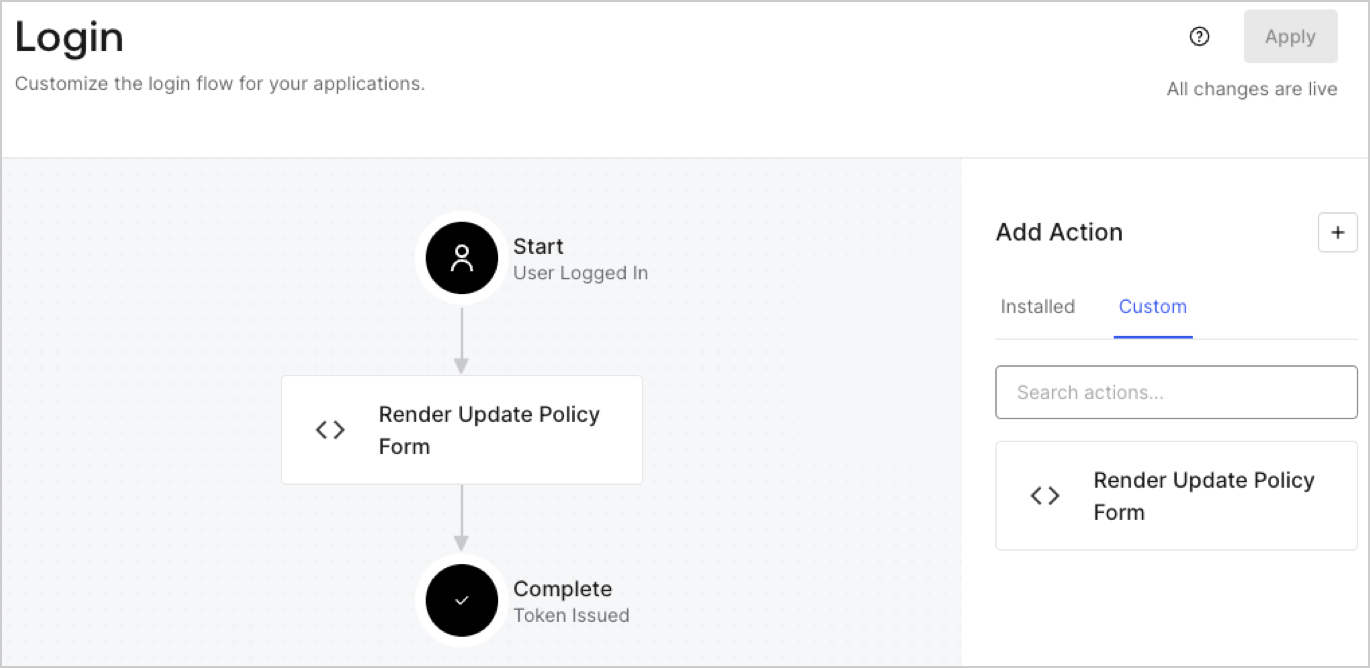
1. Navigate to **Auth0 Dashboard > Actions > Flows > Login.**
2. Select the **+** icon and Select **Build from scratch**:

   * **Name**: Enter `Render Update Policy Form`.
   * **Trigger**: Select `Login / Post Login`.
   * **Runtime**: Select the recommended version.
3. Select **Create**.

To configure the post-login Action:

1. Delete the existing code from the Code editor.
2. Paste the form render code into the Code editor.
3. Edit the code to define the conditional logic that will render the form.

   ```javascript lines theme={null}
   /**
   * @param {Event} event - Details about the user and the context in which they are logging in.
   * @param {PostLoginAPI} api - Interface whose methods can be used to change the behavior of the login.
   */
   exports.onExecutePostLogin = async (event, api) => {
     const FORM_ID = 'REPLACE_WITH_YOUR_FORM_ID';

     if (event.user.app_metadata.privacy_policies !== true) {
       api.prompt.render(FORM_ID);
     }
   }

   exports.onContinuePostLogin = async (event, api) => { }
   ```

   <Callout icon="file-lines" color="#0EA5E9" iconType="regular">
     The example code above will render the form when a user is missing the app metadata `privacy_policies` property.
   </Callout>
4. Select **Deploy.**
5. Drag and Drop the **Render Update Policy Form** Action to the **Login** flow.
   <Frame>
     <img src="https://mintcdn.com/docs-dev-actions-modules-ga/35vweucrIP_wn4mz/docs/images/cdy7uua7fh8z/5TOwDgevZsBqd7yZynUYWU/41ca909dc3007aed4f40ff794a05efa5/postlogin.png?fit=max&auto=format&n=35vweucrIP_wn4mz&q=85&s=af1ac78edf0b764092c005ff7baac083" alt="Dashboard > Forms > Use Case > Render update policy form login action" data-og-width="1370" width="1370" data-og-height="668" height="668" data-path="docs/images/cdy7uua7fh8z/5TOwDgevZsBqd7yZynUYWU/41ca909dc3007aed4f40ff794a05efa5/postlogin.png" data-optimize="true" data-opv="3" srcset="https://mintcdn.com/docs-dev-actions-modules-ga/35vweucrIP_wn4mz/docs/images/cdy7uua7fh8z/5TOwDgevZsBqd7yZynUYWU/41ca909dc3007aed4f40ff794a05efa5/postlogin.png?w=280&fit=max&auto=format&n=35vweucrIP_wn4mz&q=85&s=de43ac95325f3c7a3a0ed6b3ec103dbf 280w, https://mintcdn.com/docs-dev-actions-modules-ga/35vweucrIP_wn4mz/docs/images/cdy7uua7fh8z/5TOwDgevZsBqd7yZynUYWU/41ca909dc3007aed4f40ff794a05efa5/postlogin.png?w=560&fit=max&auto=format&n=35vweucrIP_wn4mz&q=85&s=3ea7a877db594bf04e6015d9908eb85f 560w, https://mintcdn.com/docs-dev-actions-modules-ga/35vweucrIP_wn4mz/docs/images/cdy7uua7fh8z/5TOwDgevZsBqd7yZynUYWU/41ca909dc3007aed4f40ff794a05efa5/postlogin.png?w=840&fit=max&auto=format&n=35vweucrIP_wn4mz&q=85&s=ac0d6f752884450c961b72ff52026f60 840w, https://mintcdn.com/docs-dev-actions-modules-ga/35vweucrIP_wn4mz/docs/images/cdy7uua7fh8z/5TOwDgevZsBqd7yZynUYWU/41ca909dc3007aed4f40ff794a05efa5/postlogin.png?w=1100&fit=max&auto=format&n=35vweucrIP_wn4mz&q=85&s=49ee1226a295ef44689db2477e172419 1100w, https://mintcdn.com/docs-dev-actions-modules-ga/35vweucrIP_wn4mz/docs/images/cdy7uua7fh8z/5TOwDgevZsBqd7yZynUYWU/41ca909dc3007aed4f40ff794a05efa5/postlogin.png?w=1650&fit=max&auto=format&n=35vweucrIP_wn4mz&q=85&s=44e0db9691676b621c9d940ba55ff4ac 1650w, https://mintcdn.com/docs-dev-actions-modules-ga/35vweucrIP_wn4mz/docs/images/cdy7uua7fh8z/5TOwDgevZsBqd7yZynUYWU/41ca909dc3007aed4f40ff794a05efa5/postlogin.png?w=2500&fit=max&auto=format&n=35vweucrIP_wn4mz&q=85&s=337d7196a441006fd4998cf8da00fb0d 2500w" />
   </Frame>
6. Select **Apply.**

### Test implementation

Test the implementation by following these steps:

1. Log in with an existing user whose app`_metadata` attribute `privacy_policies` does not have a value.
2. The post-login Action in the Login flow will render the form and prompt for acceptance.
3. Select **Auth0 Dashboard > User Management > Users,** locate the user and verify that the `app_metadata` attribute `privacy_policies` contains a `true` value and a timestamp.
